Parameter types and your own values
Parameter types aren't hand-written. LogicBlock 2 generates one small file per type, so every Get value in your project can be a parameter, including your own.
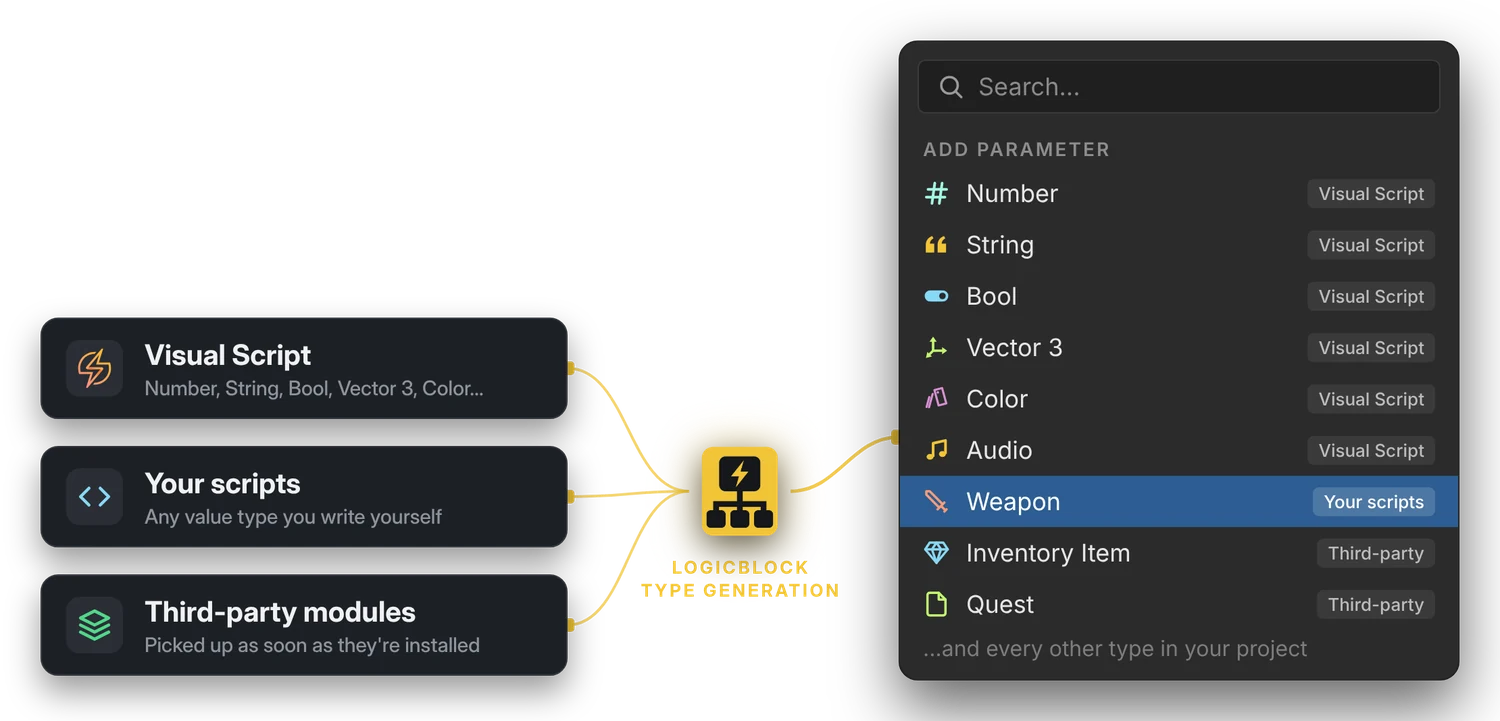
Where the files go
| Get value defined in | Generated files go to |
|---|---|
| Visual Script, other packages, your assembly definitions | Assets/Plugins/LogicBlock2/Generated Parameters |
| Your plain scripts (no assembly definition) | Assets/LogicBlock2 Generated Parameters |
Code in Assets/Plugins compiles before your plain scripts and can't see them, so parameters for types in plain scripts go to the second folder. That folder only exists when you have such types.
Each type gets two files:
<Type>.cs: the parameter type itself, shown in Add Parameter....<Type source>.Getter.cs: the Parameters > Block Parameter option for that kind of field.
When it runs
- Automatically. The generator runs after every script reload.
- Only when needed. When anything differs (a new, changed or removed type), the folder is deleted and written again, so nothing stale is left. When nothing differs, the files are left alone, so Unity doesn't recompile for nothing.
- It cleans up after itself. If a generated file stops compiling because its type was renamed or deleted, it's removed on the next compile so the project recovers.
- By hand: Tools > LogicBlock 2 > Regenerate Parameters rebuilds everything.
Don't edit generated files. They're overwritten.
Adding your own type
Any public Visual Script Get value becomes a parameter type automatically, with no extra code. For example:
csharp
using System;
using UnityEngine;
using VisualScript.Runtime;

namespace MyGame
{
    public class Item : ScriptableObject { }

    [Serializable] public abstract class TypeItem : TType<Item> { }

    [Serializable]
    public class TypeItemConstant : TypeItem
    {
        [SerializeField] private Item m_Item;

        public override Item Get(Args args) => this.m_Item;
        public override string ToString() => this.m_Item != null ? this.m_Item.name : "None";
    }

    [Title("Get Item")]
    [Image(typeof(VisualScript.Icons.IconCubeOutline), ColorTheme.Type.Orange)]
    [Serializable]
    public class GetItem : TSignalGet<TypeItem, Item>
    {
        public GetItem() : base(new TypeItemConstant()) { }
    }
}
After the next reload, Item is listed in Add Parameter..., and Item fields inside Blocks get Parameters > Block Parameter.
What isn't a parameter type
- Set values (the targets that instructions write to)
- Collections and Variables
- Types in editor-only assemblies, or in assembly definitions with Auto Referenced turned off
- Get values without a public parameterless constructor, and abstract or generic ones